Good lighting is one of the quickest ways to make video look professional. The same camera or phone can produce a flat, grainy image in poor light and a clean, polished one when the subject is lit well. Three-point lighting is the classic technique that filmmakers, interviewers and YouTubers use to light a person clearly and attractively, and it is easy to learn.
This guide explains video lighting for beginners: what three-point lighting is, how to set it up step by step, budget alternatives, how to use natural light, and common mistakes to avoid.
Why lighting matters in video
Cameras, especially phone cameras, need plenty of light to capture a sharp, low-noise image. Lighting also shapes how viewers feel about a scene. Soft, even light looks friendly and clear, which suits interviews and tutorials. Harder, contrasty light can look dramatic or moody, which suits storytelling. Learning to control light gives you control over both quality and mood.
What is three-point lighting?
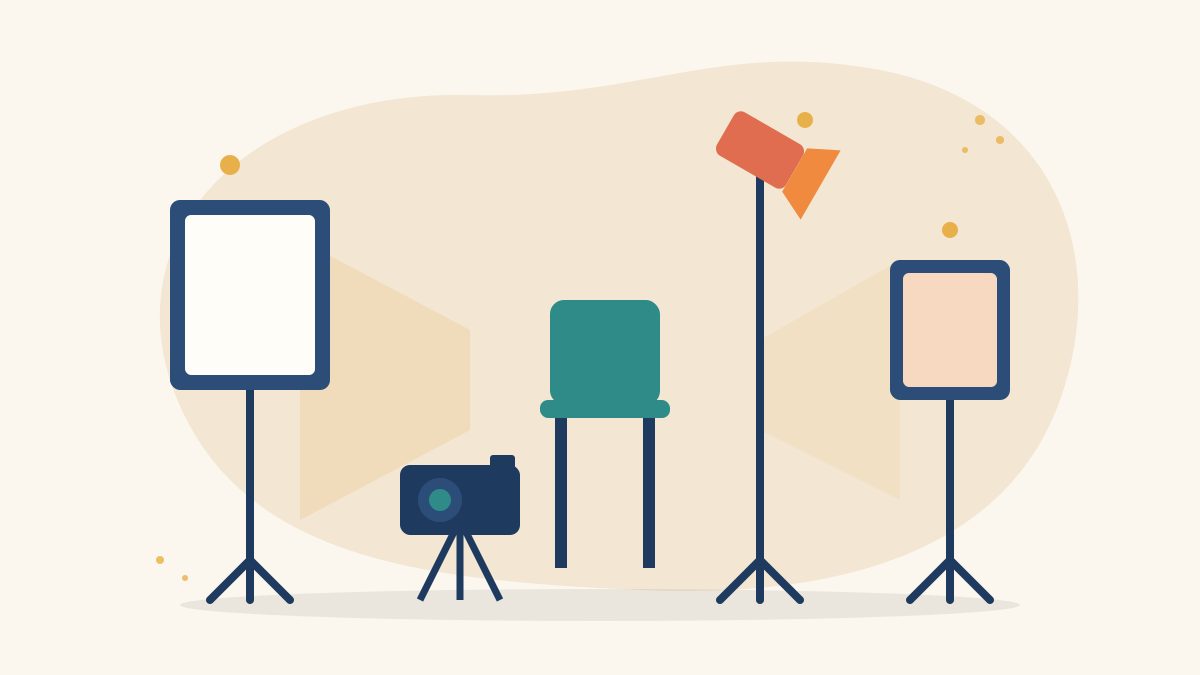
Three-point lighting uses three light sources placed around the subject:
- Key light: the main and brightest light, which lights most of the subject’s face.
- Fill light: a softer light on the opposite side that fills in the shadows created by the key light.
- Back light: also called a rim or hair light, placed behind the subject to separate them from the background.
Together, these create a balanced image with depth, so the subject does not look flat or blend into the background.
How to set up three-point lighting step by step
1. Position your subject and camera
Seat your subject a little away from the wall, around one to two metres if space allows. This reduces shadows on the background and lets you light the background separately. Place the camera at roughly eye level.
2. Set the key light
Place the key light at about a 45-degree angle to one side of the camera, slightly above the subject’s eye level and angled down. Turn on only this light first and look at the face. You should see clear light on one side and gentle shadows on the other. Use a softbox, umbrella or diffusion material to make the light softer and more flattering.
3. Add the fill light
Place the fill light on the opposite side of the camera, also at about 45 degrees. Keep it dimmer than the key light, or move it further away, so it softens the shadows without removing them. The difference in brightness between key and fill is called the lighting ratio. A smaller difference gives a bright, even look; a bigger difference gives more drama.
4. Add the back light
Place the back light behind the subject, on the side opposite the key light, raised high and pointed at the back of the head and shoulders. Keep it out of the camera frame. A thin outline of light around the hair and shoulders separates the subject from the background.
5. Check the background and adjust
Look at the whole frame on your camera screen. Is the background too dark or too bright? Are there distracting shadows? Adjust light positions, brightness and the subject’s distance from the wall until the image looks balanced.
6. Set your camera
Set the white balance to match your lights rather than leaving it on auto, so the colour stays consistent through the shoot. Lock exposure and focus if your phone or camera allows it.
Lighting on a small budget
You do not need expensive studio kits to practise. Budget-friendly options include:
- LED panels or ring lights with adjustable brightness.
- Household lamps with daylight-colour bulbs, as long as all bulbs are the same colour temperature.
- DIY diffusion such as white cloth, baking paper or a white shower curtain, kept a safe distance from hot bulbs.
- Reflectors made from white foam board or chart paper to bounce light back as fill.
Safety first: avoid overloading sockets, keep cables taped down and never place fabric directly on hot lights.
Using natural light
Window light costs nothing and looks beautiful when used well. Face your subject towards a window, or at an angle to it, to use it as the key light. Use a white reflector on the other side as fill. Avoid harsh midday sun directly on the face, and remember that natural light changes as clouds move and the day goes on, so shoot important takes together.
Common lighting styles to try
- High-key lighting: bright, low-contrast light for tutorials, interviews and commercials.
- Low-key lighting: darker, high-contrast light for drama and mystery.
- Rembrandt lighting: a key light angled so a small triangle of light appears on the shadow side of the face.
- Silhouette: a bright background with the subject unlit for a dramatic outline.
Common beginner mistakes
- Mixing light colours, such as warm bulbs with cool daylight, which creates uneven skin tones.
- Placing the key light directly in front of the face, which flattens features.
- Lighting from too low, which looks unnatural.
- Letting the back light or a lamp appear in the frame.
- Overexposing faces so skin loses detail.
- Ignoring reflections in glasses, which you can reduce by raising lights or angling them.
Practice exercise
Film the same person speaking for 30 seconds in four set-ups: key light only, key plus fill, full three-point lighting, and window light with a reflector. Compare the clips side by side. You will quickly see how each light changes the image. Pair this with our guides to DaVinci Resolve for beginners and how to make a storyboard to plan and finish your first polished video.
Learn lighting and filmmaking with Karuna Media
At Puppets Picture Education Trust (PPET) in Noida, the 12-month Karuna Media Master Program trains women from underprivileged backgrounds in filmmaking, cinematography, video editing, audio, graphic design and AI content creation, followed by a career phase with placement support. Hands-on practice with cameras and lights is part of building job-ready skills.
If you want to learn filmmaking and build a media career, apply to the program. If you would like to help more women access this training, please visit our donate page.
Final thoughts
Video lighting for beginners comes down to a few principles: a main light to shape the face, a softer fill for the shadows, a back light for depth and consistent colour throughout. Master three-point lighting and every interview, tutorial and short film you make will look clearer and more professional.
The Giving Movement by Karuna Media · #TheGivingMovement
Wear the cause: tees, a tote and a mug that fund media training for women
Tee (Black) ₹699 · Tee (White) ₹649 · Tote ₹449 · Mug ₹399. Printed on demand and shipped across India. 100% of the profit funds media training for underprivileged women.
Buy now on Razorpay Prefer to donate? Go to our donate pageMerch is a purchase, not a donation, and is not eligible for 80G. To make a donation, use our donate page.